> ## Documentation Index
> Fetch the complete documentation index at: https://hbx-docs.uplifthub.io/llms.txt
> Use this file to discover all available pages before exploring further.
# Shopping Cart
export const Ui = ({children}) =>
{children}
;
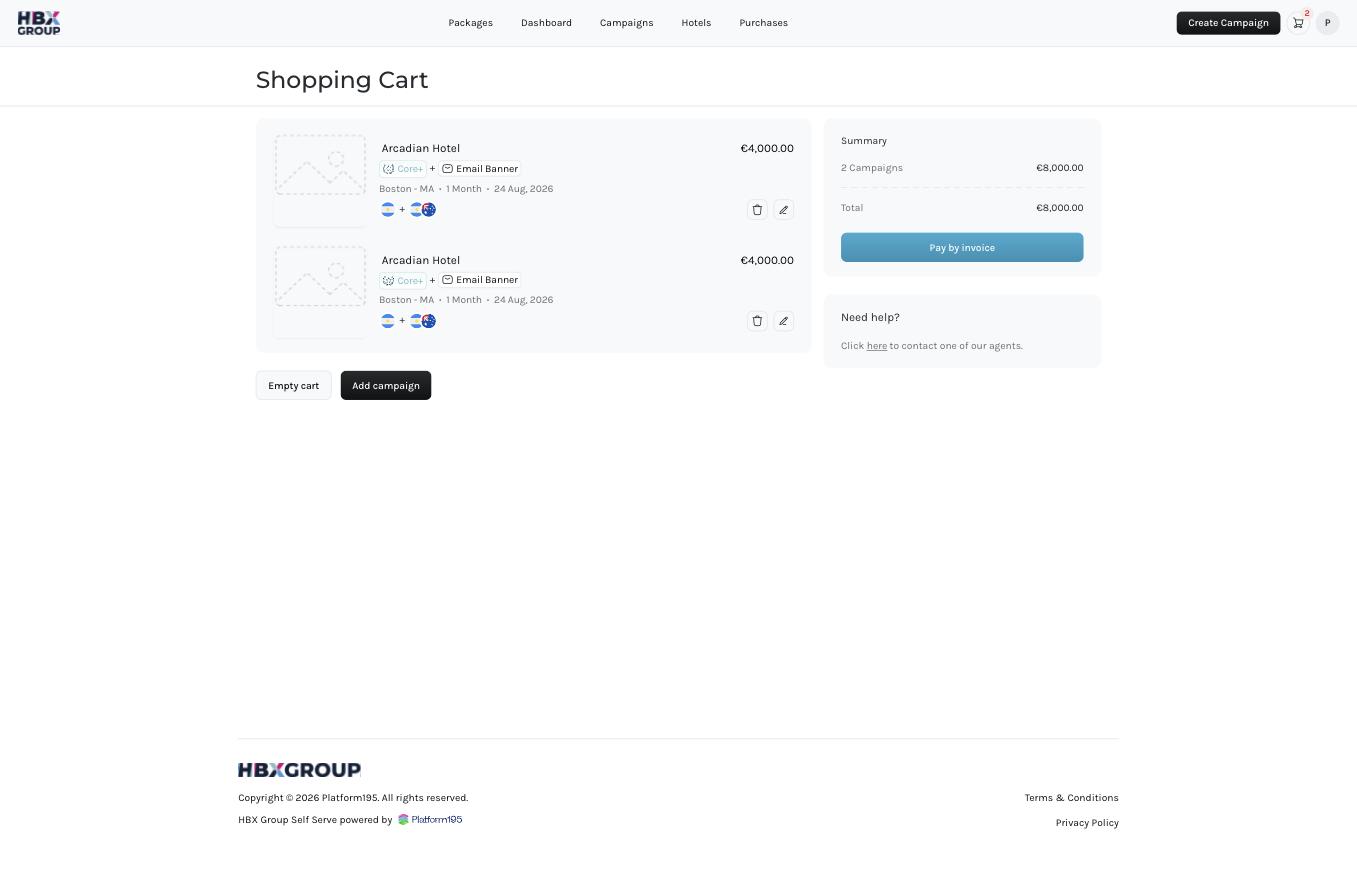
Your cart holds the campaigns you've built but not yet ordered. Open it from the **cart icon** in the top right. From here you can review each campaign, make last-minute changes, add more, or proceed to pay by invoice.
## What's in the cart
Each campaign in the cart shows its hotel, package, add-ons, district, timeline and start date, along with its price. The **Summary** panel on the right totals everything:
* **Campaigns** — the combined price of the campaigns in your cart.
* **Discount** — any discount applied, such as the 25% for 2+ month timelines.
* **Total** — the amount that will be invoiced.
## Actions
Click the **pencil** icon on a campaign to change its details, or the **bin** icon to remove it from the cart.
Click Add campaign to build another one before ordering, or Empty cart to clear everything and start over.
Click Pay by invoice to continue to the [checkout](/checkout/checkout) and enter your billing details.
Payment is collected via invoice after you submit your order — no card details are taken in the Self Serve App at this time.